
coffee 是一个 zola 的博客主题!
此主题可以使用 mermaid 和 KaTeX 公式。
https://zola-coffee-theme.netlify.app/

请参考以下内容安装 zola。
https://www.getzola.org/documentation/getting-started/installation/
[!TIP] 如果你想使用 coffee 主题仓库作为博客,除了在克隆仓库后进行
2-6.步骤中的额外设置外,不需要做2.步骤。
2-1. 创建你的博客项目
zola init < your blog project >请如下选择
Welcome to Zola!
Please answer a few questions to get started quickly.
Any choices made can be changed by modifying the `config.toml` file later.
> What is the URL of your site? (https://example.com): < "Don't enter anything." >
> Do you want to enable Sass compilation? [Y/n]: y
> Do you want to enable syntax highlighting? [y/N]: y
> Do you want to build a search index of the content? [y/N]: y

Done! Your site was created in /home/hello/Desktop/coffee-sample/docs

Get started by moving into the directory and using the built-in server: `zola serve`
Visit https://www.getzola.org for the full documentation.
2-2. 更改目录到你的博客项目
cd ./< your blog project >/themes/2-3. 克隆 coffee 主题到 theme 目录并移除 coffee 主题仓库的 .git 目录
git clone https://github.com/Myxogastria0808/coffee.git
rm -rf coffee/.git
2-4. 更改目录到你的博客项目的根目录
cd ..2-5. 替换你的博客项目的 config.toml 设置
以下是替换配置的内容。
部署博客时,请将 base_url 更改为你的博客 URL。
在开发期间,我建议保持 base_url 不变。
theme = "coffee"

# 站点将构建的 URL
base_url = "/"

# 站点标题和描述;默认在 feed 中使用。
title = "coffee"
description = "A simple theme for Zola inspired by coffee."

# 是否自动编译 sass 目录中的所有 Sass 文件
compile_sass = true

# 设置为 "true" 时,生成的 HTML 文件将被压缩。
minify_html = true

# 是否构建搜索索引以供稍后由 JavaScript 库使用
build_search_index = true

# RSS/Atom 订阅
generate_feeds = true
# 用于订阅的文件名。也用作模板文件名。
# 默认为 ["atom.xml"],它有一个内置模板渲染 Atom 1.0 订阅。
# 还有一个内置模板 "rss.xml" 渲染 RSS 2.0 订阅。
feed_filenames = ["rss.xml"]

# 为站点渲染的分类法及其默认语言配置
# 示例:
#     taxonomies = [
#       {name = "tags", feed = true}, # 每个标签都有自己的订阅
#       {name = "tags"}, # 你可以在多种语言中使用相同名称的分类法
#       {name = "categories", paginate_by = 5},  # 每个术语每页 5 项
#       {name = "authors"}, # 基本定义:无订阅或分页
#     ]
#
taxonomies = [
    {name = "tags", feed = true},
]

[markdown.highlighting]
# 亮色模式下使用的语法高亮主题
light_theme = "github-light"
# 暗色模式下使用的语法高亮主题
dark_theme = "github-dark"

[markdown]
# 设置为 "true" 时,emoji 别名会在渲染的 Markdown 文件中转换为对应的
# Unicode emoji 等效项。(例如::smile: => 😄)
render_emoji = true

# 外部链接是否在新标签页中打开
# 如果为 true,出于安全原因,总是会自动添加 `rel="noopener"`
external_links_target_blank = true

# 是否为所有外部链接设置 rel="noreferrer"
external_links_no_referrer = true

# 是否启用智能标点(将引号、破折号、点更改为排版形式)
# 例如,`...` 变为 `…`,`"quote"` 变为 `“curly”` 等
smart_punctuation = true

[search]
# 是否在索引中包含页面/版块的标题
include_title = true
# 是否在索引中包含页面/版块的描述
include_description = true
# 是否在搜索索引中包含页面的 RFC3339 日期时间
include_date = true
# 是否在索引中包含页面/版块的路径(永久链接总是包含在内)
include_path = true
# 是否在索引中包含页面/版块的渲染内容
include_content = true

[slugify]
# 各种 slug 化策略,详见下文
# 默认为所有内容都作为 slug
paths = "off"
taxonomies = "off"
# 是否移除页面路径 slug 的日期前缀。
# 例如,content/posts/2016-10-08_a-post-with-dates.md => posts/a-post-with-dates
# 当为 true 时,content/posts/2016-10-08_a-post-with-dates.md => posts/2016-10-08-a-post-with-dates
paths_keep_dates = true
2-6. 向你的博客项目的 config.toml 添加额外设置
此主题提供以下附加设置。
所有设置都有默认值,所以你只需要添加想要更改的设置。
config.toml[extra.coffee] #<- 注意:必须是 [extra.coffee],不是 [额外配置]。
# 默认值: 'en'
lang = "en"
# 默认值: 'blog'
keyword = "blog"
# 默认值: 'https://raw.githubusercontent.com/Myxogastria0808/coffee/heads/main/static/favicon.svg'
# 快捷图标必须是 SVG 图片。
icon = "https://raw.githubusercontent.com/Myxogastria0808/coffee/heads/main/static/favicon.svg"
# 默认值: ''
twitter_site = ""
# 默认值: '@yuki_osada0808'
twitter_creator = "@yuki_osada0808"
# 默认值: 'https://raw.githubusercontent.com/Myxogastria0808/coffee/heads/main/static/coffee.webp'
meta_image = "https://raw.githubusercontent.com/Myxogastria0808/coffee/heads/main/static/coffee.webp"
# 默认值: 'coffee theme'
meta_image_alt = "coffee theme"
# 默认值: '512'
meta_image_width = "512"
# 默认值: '512'
meta_image_height = "512"
# 默认值如下
about = """
Hello, my name is <strong>Myxogastria0808.</strong><br/>
I created a Zola theme named <strong>"coffee"</strong>.
This template can be used <strong>mermaid</strong> and <strong>katex</strong>.
<h4>Have a nice day!</h4>
"""
# 默认值: 'https://raw.githubusercontent.com/Myxogastria0808/coffee/heads/main/static/coffee.webp'
about_image = "https://raw.githubusercontent.com/Myxogastria0808/coffee/heads/main/static/coffee.webp"
# 默认值: 'coffee theme'
about_image_alt = "coffee theme"
# 默认值: '512'
about_image_width = "512"
# 默认值: '512'
about_image_height = "512"config.toml 部分)[extra.coffee]
keyword = "blog coffee drink"
about = """
Hello, my name is <strong>Myxogastria0808.</strong><br/>
This blog is made by Zola. This is a sample blog of coffee theme.
"""2-7. 替换你的博客项目的 content/_index.md 设置
以下是 _index.md 的内容,它将在 content 目录中新建。
_index.md+++
sort_by = "date"
template = "index.html"
page_template = "blog-template.html"
in_search_index = true
+++
zola buildzola serve以下示例已设置。
[!NOTE] 此仓库包含 coffee 主题仓库作为子模块。
https://github.com/Myxogastria0808/coffee-sample.git
https://zola-coffee-theme-sample.netlify.app/
你可以查看下面的文章示例。
+++
title = "coffee"
date = 2025-08-19
authors = ["Myxogastria0808"]
[taxonomies]
tags = ["coffee"]
+++

The best part of my morning is the quiet moment with a steaming mug of coffee.
It's a simple, potent reminder that a new day has truly begun.

## Greeting

Hello, coffee lovers! ☕

My name is Myxogastria0808, and I like coffee too!

## How I like to drink coffee

My favorite way to drink coffee is to add caramel flavored sugar to black coffee!

## Coffee logo

I create a logo for my blog theme named "coffee".

{{ image(path="/content/coffee/coffee.webp") }}
请参考以下内容查看实际示例。
https://github.com/Myxogastria0808/coffee/blob/main/content/sample/index.md
https://zola-coffee-theme.netlify.app/sample/
https://www.getzola.org/documentation/content/syntax-highlighting/
```rs
fn main() {
    println!("Hello, world!");
}
```
{{ image(path="/image/path") }}你可以添加 width=int, height=int, 和 caption=String 作为 image 短代码的选项。
你可以在下面看到 image 短代码示例。
https://github.com/Myxogastria0808/coffee/blob/main/content/sample/index.md
https://zola-coffee-theme.netlify.app/sample/
width, height, 和 caption 的示例{{ image(path="/content/sample/image.jpg", width=1000, height=200, caption="caption") }}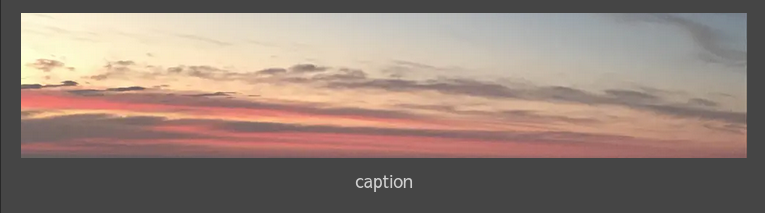
[!NOTE] 图片会自动转换为 webp,所以你不需要担心图片大小。
$$
<katex's syntax expression>
$$$$
\frac{dy}{dx} + p(x) y^2 + q(x) y + r(x) = 0
$$
{% mermaid() %}
<mermaid's syntax expression>
{% end %}{% mermaid() %}
graph TD;
A-->B;
A-->C;
B-->D;
C-->D;
{% end %}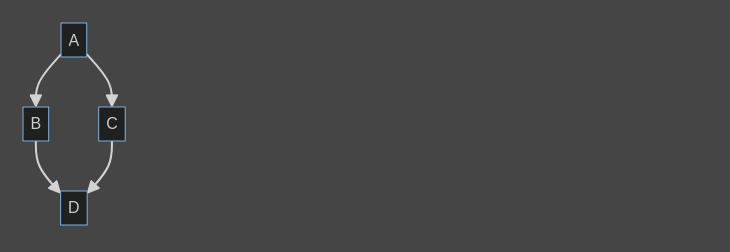
{% note() %}
Contents of the note.
{% end %}{% note() %}
This is a note.
{% end %}
{% tip() %}
Contents of the tip.
{% end %}{% tip() %}
This is a tip.
{% end %}
{% important() %}
Contents of the important.
{% end %}{% important() %}
This is a important.
{% end %}
{% warning() %}
Contents of the warning.
{% end %}{% warning() %}
This is a warning.
{% end %}
{% caution() %}
Contents of the caution
{% end %}{% caution() %}
This is a caution.
{% end %}
以下以伪 HTML 表示。
<base.html>
  <index.html></index.html>
</base.html><base.html>
<taxonomy_list.html></taxonomy_list.html>
</base.html><base.html>
<taxonomy_single.html></taxonomy_single.html>
</base.html><base.html>
<blog-template.html></blog-template.html>
</base.html><base.html>
<404.html></404.html>
</base.html>https://www.getzola.org/documentation/getting-started/overview/#content
https://swaits.com/adding-mermaid-js-to-zola/
https://sippo.work/blog/20231105-deploy-zola-with-cloudflare-pages/